
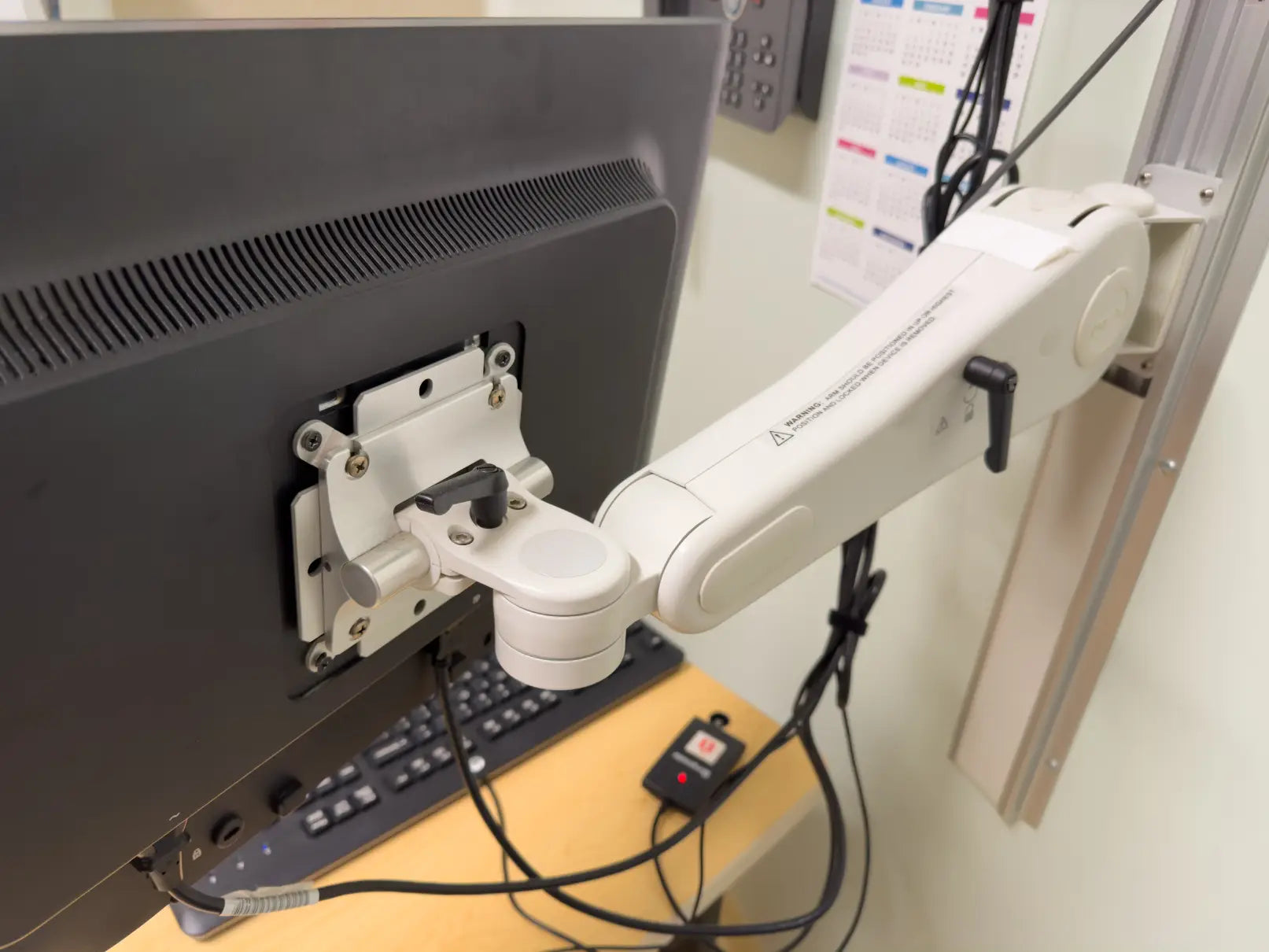
If you end the workday with a stiff neck, sore shoulders, or a cramped desk, your monitor setup could be the cause. Focusing on the chair or keyboard is common, but the monitor position also strongly affects comfort and posture.
A VESA monitor arm lets you control your screen’s position for optimal comfort. Adjust the height, angle, and distance to suit your work style rather than accommodate a fixed monitor setup.
In the following sections, we'll help you identify key signs that suggest it might be time to upgrade to a VESA monitor arm. We'll also outline the features to consider before making your choice, so you can select the best option for your setup.
A VESA monitor arm is an adjustable system that mounts a monitor to a desk or wall via a standard VESA pattern, commonly found on most monitors.
Common VESA sizes (75 × 75 mm, 100 × 100 mm) allow secure attachment to arms that adjust height, tilt, rotation, and distance.
Compared with traditional desk setups, a VESA monitor arm provides several advantages:
Because of these benefits, VESA monitor arms are widely used in modern workstations, home offices, and professional desk setups.
Monitor positioning plays an important role in maintaining a comfortable workstation. When screens are placed too low or too far away, users often lean forward or tilt their heads without realising it.
Over time, poor monitor positioning can lead to several ergonomic issues:
Ideally, the monitor should be positioned so that the top of the screen sits at or slightly below eye level when you are sitting upright. The screen should also be placed roughly an arm’s length away from your eyes.
A VESA monitor arm lets you easily adjust your screen, so your setup fits you, not the other way around.
If your neck or shoulders feel tense after hours at your desk, your monitor height could be part of the problem. When the screen sits too low, you naturally angle your head downward, even if you do not realise it while working.
A VESA monitor arm lets you raise the screen to a more comfortable level, usually so the top of the monitor sits at or slightly below eye level. This helps reduce strain and supports a more natural posture during long work sessions.
Many built-in monitor stands do not offer enough height adjustment. Even if your chair and desk are set up properly, the screen may still sit lower than it should, which makes the whole workstation feel slightly off.
If you have ever used books or random desk items to prop up your monitor, that is usually a clear sign that a better solution is needed. A VESA monitor arm gives you proper height adjustment without relying on temporary fixes.
A monitor base can take up more room than people expect, especially on a compact desk. Once you add a keyboard, mouse, notebook, charger, and a few everyday items, the setup can start to feel cramped very quickly.
Because a VESA monitor arm lifts the screen off the desk, it frees up surface space underneath and around the monitor. That extra room can make the desk feel more open, functional, and easier to work from.
If you often find yourself moving closer to the monitor, sitting up taller, or shifting your chair just to get a better view, the screen is probably not positioned properly. This usually means the monitor is too far away, too low, or not centred with your body.
A VESA monitor arm makes it easier to adjust the screen so it works with your posture instead of against it. The goal is simple: you should be able to sit naturally and see the monitor clearly without constantly readjusting yourself.
Using two monitors can be great for productivity, but standard monitor bases often make the setup harder to manage. One screen may sit higher than the other, or the monitors may take up too much desk space when placed side by side.
A VESA monitor arm helps align multiple screens more evenly and gives you more flexibility with placement. This is especially useful if you work across several windows at once or need a setup that feels balanced and comfortable for long hours.
Sometimes the issue is not just ergonomics. It is also the way the whole desk feels. If cables are visible, the monitor base is in the way, and the setup always looks cluttered, it can make the workspace feel less focused and less efficient.
Many VESA monitor arms include cable management features that help keep wires out of sight. Combined with the extra desk space created by lifting the monitor, this can make the setup look cleaner and feel easier to manage.
Not everyone works the same way all day. You may need to move the monitor closer when working on details, push it back when you need more desk space, or rotate it for specific tasks.
A VESA monitor arm gives you that flexibility. Instead of being stuck with one fixed screen position, you can adjust the monitor to suit the task, the desk layout, or even changes in how you prefer to work throughout the day.
When choosing a VESA monitor arm, the right features affect how stable, adjustable, and practical the setup will be for everyday use. A basic arm may hold the monitor, but a better-designed one makes it easier to position the screen correctly and maintain a cleaner workspace.
Important features to look for include:
Selecting a VESA arm with these features helps you create a flexible and organised workspace for long-term comfort.
Before purchasing, confirm your monitor supports VESA mount (with a standard 75 × 75 mm or 100 × 100 mm hole pattern).
You can check for VESA-compatible monitors in a few ways:
If your monitor does not support VESA mounting, you may still be able to use a VESA adapter bracket, depending on the monitor’s design. Confirming VESA compatibility ensures your monitor can be securely and safely mounted.
While a VESA monitor arm offers greater flexibility and adjustability, a monitor stand can still be suitable for certain desk setups. If your workspace does not require frequent monitor repositioning or advanced ergonomic adjustments, a monitor stand may provide sufficient support.
A monitor stand may be enough in the following situations:
A monitor stand can still improve ergonomics by raising the monitor to a more comfortable viewing height. However, for users who need greater flexibility, adjustable positioning, or more desk space, a VESA monitor arm may be the better option.
Sometimes the signs are easy to ignore at first. A bit of neck tension, a cluttered desk, or a screen that never seems to sit in the right position can all feel like small issues, but over time, they can make your workspace less comfortable and less efficient.
If several of these signs sound familiar, a monitor mount or arm may be the upgrade your desk setup needs. It can help you create a more flexible workspace, improve monitor positioning, and free up valuable desk space for everyday use.
If you are ready to improve your setup, explore Guilds’ range of ergonomic workspace solutions to find a monitor arm that fits your workflow. Contact us today!
Yes. Many VESA monitor arms are designed to support ultrawide monitors, but you must check the arm's weight capacity and maximum screen size. Ultrawide displays are often heavier and wider than standard monitors.
Most VESA monitor arms use desk clamps or grommet mounts, which work with most desks. However, desks that are extremely thick, fragile, or have curved edges may require a specific mounting solution.
Yes. With a laptop tray attachment, a VESA monitor arm can hold a laptop instead of a monitor. This is commonly used in flexible workstations and standing desk setups.
Yes. Many VESA monitor arms are compatible with standing desks and allow the monitor to move as the desk height adjusts. Some models also provide an additional height range for better ergonomics.
A well-built VESA monitor arm made from steel or aluminium can last many years with normal use. Durability depends on build quality, weight load, and how frequently the arm is adjusted.
Key Takeaways
What Is a VESA Monitor Arm?

Why Monitor Positioning Matters for Ergonomics

7 Signs You Need a VESA Monitor Arm
 If your current desk setup feels uncomfortable or cluttered, it may be time to upgrade your monitor positioning. Below are some common signs that indicate a VESA monitor arm could improve your workstation.
1. You Experience Neck or Shoulder Pain
2. Your Monitor Is Too Low on Your Desk
3. Your Desk Feels Cluttered
4. You Frequently Adjust Your Sitting Position
5. You Use Multiple Monitors
6. You Want a Cleaner Desk Setup
7. Your Workspace Needs More Flexibility
VESA Monitor Arm Features to Look For

How to Check If Your Monitor Supports VESA Mounting

Situations Where a Monitor Stand May Be Enough

Upgrade Your Desk Setup with the Right VESA Monitor Arm
Frequently Asked Questions
Can a VESA monitor arm support ultrawide monitors?
Will a VESA monitor arm fit any desk?
Can I mount a laptop on a VESA monitor arm?
Do VESA monitor arms work with standing desks?
How long do VESA monitor arms typically last?
The Different Types of Desk Monitor Stands: Which One is Right For You?
Best Monitor Setup for Coding, Design and Excel Work: Which Layout Fits Your Workflow?